Benchmark visualizer is a tool to display an output of go test -bench command in a pretty format, allowing you to view, understand and export results of your benchmarks.
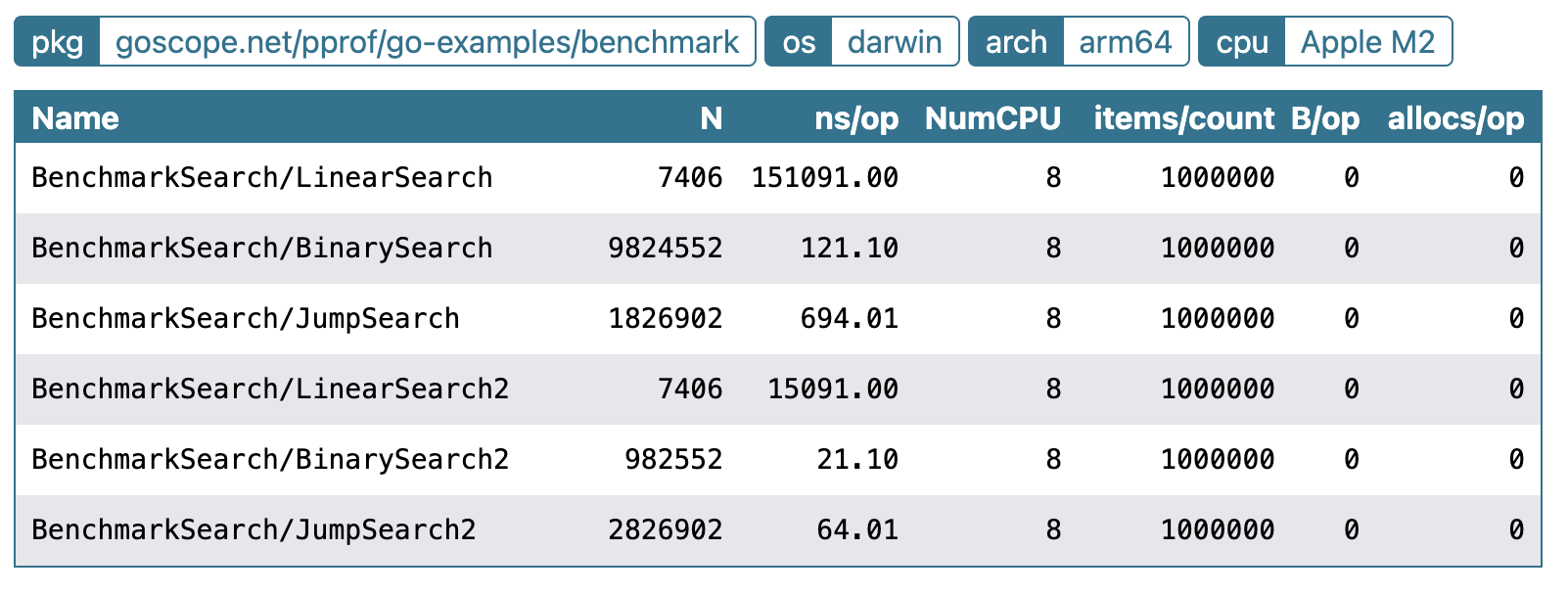
What you'll get
- Clean table format with aligned columns
- Performance metrics breakdown (ns/op, B/op, allocs/op)
- Export to Markdown for documentation
- Export to formatted plain text
- Copy individual results to clipboard
How it works
1
Run benchmarks
Execute your Go benchmark tests with the bench flag
go test -bench=.
2
Copy output
Copy the complete console output including metadata
Include goos, goarch, pkg info
3
Visualize
View results in a formatted table with export options
Export to Markdown or plain text
Don't have a benchmark yet?
Golang offers a built-in benchmarking framework as a part of the testing package. For instance, try running the following test file:
package benchmark

import (
	"math"
	"math/rand"
	"runtime"
	"slices"
	"testing"
)

var data []int

func init() {
	const dataSize = 1000 * 1000
	data = make([]int, dataSize)

	for i := range data {
		data[i] = rand.Int()
	}

	slices.Sort(data)
}

func BenchmarkSearch(b *testing.B) {
	type Case struct {
		Name string
		Do   func([]int, int)
	}

	cases := []Case{
		{"LinearSearch", LinearSearch},
		{"BinarySearch", BinarySearch},
		{"JumpSearch", JumpSearch},
	}

	for _, c := range cases {
		c := c

		b.Run(c.Name, func(b *testing.B) {
			b.ReportMetric(float64(len(data)), "items/count")
			b.ReportMetric(float64(runtime.NumCPU()), "NumCPU")
			b.SetBytes(1024*1024 + 512*1024 + 128)
			b.ReportAllocs()

			for i := 0; i < b.N; i++ {
				target := data[rand.Intn(len(data))]
				c.Do(data, target)
			}
		})
	}
}

func LinearSearch(xs []int, x int) {
	for _, y := range xs {
		if x == y {
			break
		}
	}
}

func BinarySearch(xs []int, x int) {
	_, _ = slices.BinarySearch(xs, x)
}

func JumpSearch(xs []int, x int) {
	n := len(xs)
	if n == 0 {
		return
	}

	step := int(math.Sqrt(float64(n)))
	prev := 0

	for xs[min(step, n)-1] < x {
		prev = step
		step += int(math.Sqrt(float64(n)))
		if prev >= n {
			return
		}
	}

	for i := prev; i < min(step, n); i++ {
		if xs[i] == x {
			return
		}
	}
}
Save this file as benchmark_test.go, then run it with go test -bench=. command:
$ go test -bench=.

goos: darwin
goarch: arm64
pkg: goscope.net/pprof/go-examples/benchmark
cpu: Apple M2
BenchmarkSearch/LinearSearch                7306            215740 ns/op           8.000 NumCPU      1000000 items/count         0 B/op          0 allocs/op
BenchmarkSearch/BinarySearch             7995318               149.5 ns/op         8.000 NumCPU      1000000 items/count         0 B/op          0 allocs/op
BenchmarkSearch/JumpSearch               1542253               931.4 ns/op         8.000 NumCPU      1000000 items/count         0 B/op          0 allocs/op
PASS
ok      goscope.net/pprof/go-examples/benchmark 5.671s
For more information, please refer to the official documentation.
Paste your benchmark console output (it won't be sent anywhere) and click "Go!" to visualize it.
1
We will process this benchmark output locally. No data will be sent to our servers.